By the GTZHost Infrastructure Team | Last updated: November 5, 2026 | 14 min read
Quick Answer: NVMe vs SATA SSD
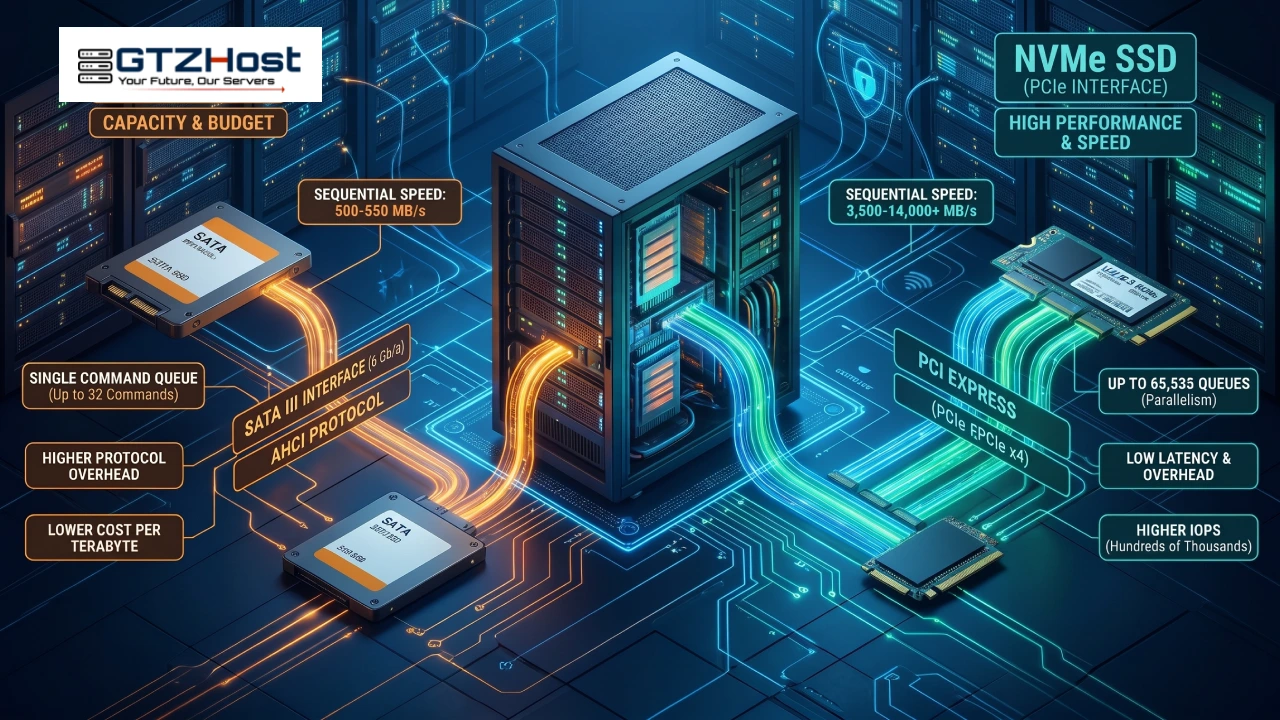
A SATA SSD communicates with the server through the SATA III interface and the AHCI protocol. That limits real-world sequential speeds to roughly 500–550 MB/s and allows a single command queue of up to 32 commands. An NVMe SSD uses PCI Express (PCIe) and a protocol designed specifically for flash storage. It delivers sequential speeds of roughly 3,500–14,000+ MB/s depending on the PCIe generation and drive model, with far greater queue parallelism and lower protocol overhead.
On a dedicated server, NVMe offers the most value when storage performance limits your application. SATA SSD remains a practical choice when capacity and cost matter more than maximum storage speed.
Key Takeaways
NVMe raises the performance ceiling. It offers higher potential IOPS, lower latency and greater parallelism. The real benefit depends on whether your workload is limited by storage.
Some workloads gain more than others. Databases with synchronous commits, busy online stores, virtualization hosts and analytics platforms benefit most.
Measure before upgrading. Persistent I/O wait, rising device latency and growing I/O queues can indicate a storage bottleneck.
Think about the whole configuration. Match drives with suitable redundancy, enterprise endurance ratings, power-loss protection and network capacity.
Picture a dedicated server with 32 CPU cores and 256GB of RAM. Traffic doubles on a Monday morning, but CPU utilization stays around 40% while the wa (I/O wait) figure reaches 35%. The processors are not short of capacity. They are spending a large share of their time waiting for storage operations to complete.
That is why storage deserves as much attention as CPU and memory when you configure a dedicated server. This guide explains the technical differences between NVMe and SATA SSD storage, how those differences affect IOPS, latency and throughput, which workloads suit each option, and how to test your existing server before investing in an upgrade.
Why Storage Becomes a Bottleneck on a Dedicated Server
Every application request that cannot be served from memory may eventually need a storage operation. The I/O path typically runs through the application, page cache, filesystem, Linux block layer, storage driver and physical drive.
RAM access is measured in nanoseconds, while SSD operations are measured in microseconds. Reading from storage therefore takes far longer than reading data already in memory.
On a busy server, these operations accumulate. Database reads that miss the buffer pool, transaction-log flushes, checkpoints, virtual machine disk writes and background maintenance all compete for the same device. When the drive cannot keep up, processes wait on I/O, and application response times rise while CPU utilization stays relatively low.
Common Signs of a Storage Bottleneck
Look for several symptoms together rather than relying on one metric:
Elevated I/O wait (
wa) over sustained periods intop,htoporvmstat.Increasing average queue size (
aqu-sz) and read or write latency (r_await,w_await) iniostat.Database commit latency or slow queries increasing while CPU utilization stays moderate.
Backups, database maintenance or index rebuilds degrading production performance.
Memory pressure, inefficient queries, missing indexes and swapping can produce similar symptoms. Rule these out before deciding that the drive needs an upgrade. The measurement section later in this guide shows how.
NVMe vs SATA SSD: The Technical Differences
Both drive types store data in NAND flash memory. What differs is how the drive communicates with the server and how efficiently it handles concurrent requests.
SATA SSD: SATA III and AHCI
SATA III operates at a signaling rate of 6 Gb/s. After 8b/10b encoding overhead, usable bandwidth is approximately 600 MB/s, and most SATA SSDs deliver 500–550 MB/s sequentially.
SATA uses the Advanced Host Controller Interface (AHCI), a protocol designed around the needs of traditional hard drives. AHCI provides a single command queue with up to 32 outstanding commands. That is sufficient for many everyday workloads, but it limits parallelism compared with NVMe.
SATA SSDs remain useful for general-purpose hosting, websites, development environments and capacity-focused configurations where their speed is sufficient.
NVMe SSD: PCIe and a Protocol Built for Flash
NVMe (Non-Volatile Memory Express) connects storage to the server over PCI Express lanes. Most enterprise NVMe drives use a PCIe x4 connection and a command protocol designed for high-speed flash.
The NVMe specification supports up to 65,535 I/O queues with up to 65,536 commands per queue. Actual queue counts and depths depend on the drive, operating system, controller and platform. Linux can spread NVMe queues across available CPUs, which reduces contention when many processors issue storage requests at once. That design suits many-core AMD EPYC and Intel Xeon servers running databases, virtual machines and other concurrent workloads.
Theoretical bandwidth of a PCIe x4 link varies by generation:
PCIe Gen3 x4: approximately 3.94 GB/s
PCIe Gen4 x4: approximately 7.88 GB/s
PCIe Gen5 x4: approximately 15.75 GB/s
These are link-level figures before additional protocol overhead. Actual drive performance depends on the SSD controller, NAND, firmware, cooling and workload.
NVMe Form Factors: M.2, U.2, U.3 and EDSFF
NVMe is a protocol, not a physical shape. M.2 is a form factor that can carry either a SATA drive or an NVMe drive, so an M.2 connector alone does not confirm NVMe.
NVMe drives also come in server-oriented formats:
U.2 and U.3: 2.5-inch enterprise SSDs designed for server deployment and serviceability.
EDSFF: enterprise and data center form factors, including E1.S and E3.S.
PCIe add-in cards: expansion cards that provide NVMe storage through PCIe slots.
M.2 NVMe: compact drives used where the motherboard provides compatible slots.
Server platforms often favor U.2, U.3 or EDSFF for serviceability and chassis integration. M.2 can work well too, but cooling and thermal throttling need attention. Always check the drive's interface in its specification rather than relying on the connector.
NVMe vs SATA SSD: Feature Comparison
| Attribute | SATA SSD | NVMe SSD |
|---|---|---|
| Interface | SATA III (6 Gb/s) | PCIe x4 (Gen3, Gen4, Gen5) |
| Protocol | AHCI | NVMe |
| Command queues | 1 queue, up to 32 commands | Up to 65,535 queues, depending on implementation |
| Sequential bandwidth | Around 500–550 MB/s | Around 3,000–14,000+ MB/s |
| Random 4K read IOPS | Commonly tens of thousands | Hundreds of thousands to over 1 million on suitable drives |
| Protocol overhead | Higher | Lower |
| Common server form factors | 2.5-inch SATA, M.2 SATA | U.2, U.3, EDSFF, M.2, PCIe add-in card |
| Cost per terabyte | Generally lower | Generally higher |
| Best suited to | Capacity-focused, moderate-I/O workloads | Latency-sensitive, highly concurrent workloads |
These are typical ranges, not guarantees. Actual results depend on the SSD model, controller, firmware, PCIe generation, workload and server configuration.
Storage Performance: What the Numbers Mean on a Real Server
Throughput
Sequential throughput measures how quickly a device transfers large, continuous blocks of data. It matters for database backups and restores, large media files, ETL jobs, analytics datasets and bulk file transfers.
A SATA SSD is limited by the SATA interface. A PCIe Gen4 NVMe drive can deliver several gigabytes per second under suitable conditions. Moving a 500GB dataset at 550 MB/s takes roughly 15 minutes under ideal conditions. At 7,000 MB/s the theoretical time is about 71 seconds. Real backup and restore times also depend on the filesystem, source and destination devices, compression, CPU and network throughput.
IOPS, Queue Depth and Concurrency
IOPS counts the individual read or write operations a device completes per second. Web applications, databases and virtual machines mostly perform small random operations, so IOPS and latency often matter more than headline sequential bandwidth.
Concurrency, latency and IOPS are related through Little's Law:
IOPS ≈ outstanding requests ÷ average latency (in seconds)
If each request takes 80 microseconds and 16 requests are outstanding, the relationship gives roughly 200,000 IOPS. This is a simplified model, not a guaranteed figure. Real devices have controller, firmware and NAND limits that cap throughput.
AHCI allows 32 outstanding commands on one queue. NVMe supports far more parallelism, which suits workloads with many concurrent requests.
Latency and Tail Latency
Latency is the time one storage operation takes. Average latency is useful, but tail latency tells you more about user experience. It is usually reported as p95, p99 and p99.9 percentiles.
A database may normally commit in under a millisecond but occasionally hit a 20 ms delay. Those slow operations lengthen transactions and can stall other transactions waiting on locks. NVMe generally offers lower latency than SATA SSD, especially under concurrent load, and enterprise NVMe models are tuned for consistency under sustained workloads.
Why Datasheet Numbers Differ From Production Results
Queue depth: manufacturers publish results at high queue depth. A single-threaded application issuing one request at a time sees a much smaller NVMe advantage.
Steady-state vs burst performance: some SSDs absorb writes in an SLC cache. Once it fills, sustained write speed drops. Check steady-state figures for production use.
Thermal throttling: high-performance NVMe drives generate heat, and poor airflow makes them slow down.
Software overhead: filesystems, encryption, virtualization layers and checksumming all reduce the performance applications actually see.
How Storage Affects Different Dedicated Server Workloads
Different applications generate different storage patterns, so the right choice depends on how the workload reads, writes and accesses data.
Relational Databases: MySQL, MariaDB and PostgreSQL
Many reads are served from the database buffer pool, but durable commits require writes to storage. With common durability settings such as innodb_flush_log_at_trx_commit=1 in InnoDB and synchronous_commit=on in PostgreSQL, a commit waits until the log records are flushed according to the database and operating system's durability rules. Storage latency therefore sets how fast commits complete.
Checkpoints, purge, vacuum and other background tasks add further writes, and a dataset larger than RAM adds random reads. Low-latency enterprise NVMe can improve commit performance without weakening durability, provided the whole storage path honors flush and write-cache requirements.
Online Stores and CMS Platforms: WooCommerce, Magento and WordPress
Page caches, object caches such as Redis and a CDN reduce the load that reaches the database. Several operations still need direct database or session access: cart updates, checkout, inventory changes, logged-in sessions, internal search and admin tasks. These grow during sales campaigns and traffic spikes.
NVMe helps when uncached database operations and concurrent writes create measurable storage pressure. Caching, query optimization and the right CPU configuration deserve attention as well.
Virtualization: Proxmox VE, VMware and KVM
Each virtual machine has its own storage workload. When they share physical storage, their combined requests form a highly random pattern often called the I/O blender effect. Snapshots, backups, live migration and copy-on-write storage add more activity. NVMe's higher IOPS and lower latency suit hosts running many active guests.
Search, Analytics and Log Pipelines: Elasticsearch, OpenSearch and ClickHouse
These platforms mix random reads, sequential scans and sustained writes. Segment merging, compaction, indexing and large queries put heavy pressure on storage, and both bandwidth and IOPS matter. The benefit of NVMe depends on dataset size, memory allocation, query patterns and concurrency.
Game Servers
Tick rate depends mainly on CPU performance, game-engine behavior and network conditions. Storage comes into play for world saves, map loading, chunk generation, startup and backups. NVMe shortens those delays, especially when several game instances share one machine, but it will not fix a CPU-bound game loop or network latency.
AI and Machine Learning Pipelines
Data loaders may read thousands of files in parallel while training jobs write large checkpoints. NVMe helps keep GPUs supplied when storage throughput is the limit. Once the working dataset sits in RAM or GPU memory, storage speed matters much less to the active computation.
Web Hosting and Reseller Hosting: cPanel, Plesk and DirectAdmin
These servers handle many small files, mailboxes and databases across multiple accounts. Enterprise SATA SSDs in RAID 1 or RAID 10 serve many moderate-density environments well. NVMe becomes relevant as account density grows, databases get heavier or several tenants generate demanding mail and storage workloads.
When a SATA SSD Dedicated Server Is the Right Choice
SATA SSD is not a second-class option. It is a practical choice when storage is not the main limitation. Consider it when:
your active working set fits in RAM and storage reads are infrequent
the application is CPU-bound, network-bound or waiting on external APIs
you need several terabytes at a lower cost per terabyte
the server runs staging, CI/CD, development or low-traffic production sites
the workload does not need NVMe's lower latency and higher parallelism
GTZHost SSD dedicated server configurations cover these cases on Intel Xeon (E-series and Scalable), AMD EPYC and AMD Ryzen 9 platforms, with up to 768GB of RAM. You can configure a primary SSD and add further drives to build a multi-drive array.
Software RAID (0, 1 and 10) is available on supported multi-drive configurations. Selected enterprise chassis also offer hardware RAID controllers (0, 1, 5 and 10) with onboard cache. Drives, RAID options and controller features vary by server, so check the specifications of each system.
When an NVMe Dedicated Server Is Worth the Investment
Consider NVMe when storage performance is a measured limitation, not just a spec you would like to upgrade. Look for these indicators:
I/O wait, device latency and queue depth rise during normal peak traffic, not only during backups
database profiling shows storage commit latency as a significant constraint
a virtualization host runs many active guests against shared storage
the active dataset is larger than RAM and generates frequent random I/O
software licensing is tied to CPU cores, so processors waiting on storage waste money
GTZHost NVMe dedicated servers cover several hardware profiles:
An AMD Ryzen 9 7950X configuration with dual NVMe drives suits game hosting, development and compilation workloads that benefit from high clock speeds.
Frequency-optimized AMD EPYC processors such as the 9374F suit databases that need strong per-core performance alongside fast storage.
Dual-socket EPYC configurations with multi-terabyte NVMe storage target larger analytics, virtualization and data-intensive deployments.
GPU servers pair NVMe storage with accelerators for machine learning.
Availability and specifications vary by location and stock, so check the live lineup before planning a deployment.
RAID, Redundancy and Drive Endurance
Choosing between NVMe and SATA is only part of a reliable storage design. Production servers also need a redundancy strategy and drives rated for the workload.
RAID Levels at a Glance
| RAID level | Minimum drives | Failure tolerance | Typical use |
|---|---|---|---|
| RAID 0 | 2 | None | Scratch space and rebuildable data |
| RAID 1 | 2 | One drive in a two-drive mirror | Boot volumes and smaller databases |
| RAID 5 | 3 | One drive | Capacity-oriented arrays |
| RAID 10 | 4 | One drive per mirrored pair | Databases and virtualization |
RAID 10 can survive multiple drive failures if the failed drives belong to different mirrored pairs. Losing both drives of the same pair destroys the array. Choose a level based on performance, usable capacity, recovery requirements and the cost of a failure.
Software RAID, Hardware RAID and CPU-Attached NVMe
SATA SSD servers can use software RAID such as Linux mdadm, or a hardware RAID controller with onboard cache. NVMe drives connect over PCIe, so the available options depend on the platform and controller:
Linux mdadm: software RAID for supported NVMe and SATA configurations.
ZFS: storage management with checksumming, snapshots and data-integrity features. Automatic repair of corrupted data requires redundant copies.
Intel VROC: Virtual RAID on CPU, supporting RAID 0, 1 and 10 on compatible Intel platforms. Some configurations or RAID levels may require a license.
Hardware RAID: a dedicated controller that manages supported drives and RAID operations.
A traditional hardware RAID controller can become a limit if its PCIe uplink or processing capacity cannot handle the combined throughput of several NVMe drives. Verify supported drive types, PCIe bandwidth and rated throughput before choosing one. ZFS also uses RAM for its Adaptive Replacement Cache (ARC), so plan memory for it.
SSD Endurance and Power-Loss Protection
The NVMe label alone does not show whether a drive suits a write-heavy production workload. Check these specifications:
DWPD (Drive Writes Per Day): how many times the full capacity can be written each day during the warranty period. Enterprise read-intensive drives commonly offer around 1 DWPD, and some mixed-use models offer around 3 DWPD or more.
TBW (Terabytes Written): total data that can be written over the rated endurance period.
Power-loss protection (PLP): onboard capacitors give enough power to complete protected in-flight writes and preserve critical metadata during an unexpected power loss. This matters most for durable synchronous writes. Confirm exact PLP behavior in the manufacturer's specifications.
Steady-state performance: how the drive performs under sustained load after any fast write cache is exhausted.
Monitor drive health instead of relying on the warranty alone. For NVMe, nvme smart-log /dev/nvme0 shows health data including Percentage Used (requires nvme-cli). For SATA SSDs, smartctl -a /dev/sda shows available SMART attributes.
RAID Is Not a Backup
RAID keeps a server available after a supported drive failure. It does not protect against accidental deletion, ransomware, filesystem corruption or failures that hit the whole array. Maintain separate, versioned backups using the 3-2-1 principle: three copies, on two different media types, with one off-site. Restore regularly to prove the backups work.
Matching Storage Performance to Network Bandwidth
A fast drive does not guarantee fast delivery to users. Network bandwidth limits how quickly files are served, replicated or transferred off the server. The table compares common port speeds with one PCIe Gen4 NVMe drive reading at about 7,000 MB/s.
| Network port | Theoretical maximum | Share of one Gen4 NVMe drive |
|---|---|---|
| 1 Gbps | 125 MB/s | About 2% |
| 10 Gbps | 1,250 MB/s | About 18% |
| 25 Gbps | 3,125 MB/s | About 45% |
| 100 Gbps | 12,500 MB/s | About 179% |
Theoretical figures, before protocol overhead and other practical limits.
A database on the same server reaches its local storage without crossing the network, so the port does not limit it. The port matters when you serve files to clients, replicate between servers, send backups off-site or distribute large datasets. For those jobs, a 1 Gbps port becomes the bottleneck long before a high-performance NVMe drive does.
GTZHost offers network options from 1 Gbps through 10 Gbps and 25 Gbps, with 100 Gbps on supported configurations. Metered and unmetered bandwidth options vary by server.
How to Measure Storage Performance on Your Dedicated Server
Collect data during a busy period, then repeat the same tests after any storage change to compare results.
1. Check CPU I/O Wait
vmstat 1 10Read the wa column (I/O wait) and the b column (processes blocked on I/O). High I/O wait can point to storage delays, but it is not proof on its own. Correlate it with device latency, queue depth and application performance.
2. Inspect Device Latency and Queues
iostat -xz 1Watch these fields:
r_await: average read latencyw_await: average write latencyaqu-sz: average queue size%util: time the device was busy
%util is not a universal saturation indicator, and it is especially misleading on highly parallel NVMe devices. Evaluate latency, queue size and throughput together.
3. Find the Processes Generating I/O
iotop -oPaor
pidstat -d 14. Rule Out Memory Pressure
free -mCheck available memory, then look at the si and so columns in the vmstat output for swapping. Swapping generates heavy disk I/O. Faster drives may soften the symptoms, but they do not fix a memory shortage.
5. Correlate With Application Performance
Compare storage metrics with database slow query logs, commit latency, application response times, backup schedules and traffic peaks. This shows whether storage activity is really responsible for the slowdown.
6. Benchmark the Drive With fio
fio tests random reads, random writes, synchronous writes and sequential transfers. Install it with your distribution's package manager if needed. Use a dedicated test file on a mounted filesystem, and never run destructive write tests against a raw device holding production data. Benchmarks load the server, so run them in a maintenance window.
Random reads:
fio --name=randread --filename=/data/fio-test.bin --size=10G \
    --rw=randread --bs=4k --iodepth=32 --numjobs=4 --direct=1 \
    --ioengine=libaio --runtime=60 --time_based --group_reporting
Synchronous write latency (approximates a database commit):
fio --name=synclat --filename=/data/fio-test.bin --size=4G \
    --rw=randwrite --bs=4k --iodepth=1 --numjobs=1 --fsync=1 \
    --direct=1 --ioengine=libaio --runtime=60 --time_based
Large sequential reads:
fio --name=seqread --filename=/data/fio-test.bin --size=10G \
    --rw=read --bs=1M --iodepth=8 --numjobs=1 --direct=1 \
    --ioengine=libaio --runtime=60 --time_based
Review IOPS, bandwidth and the completion-latency percentiles, particularly p99. The --direct=1 option bypasses the page cache, so the results reflect the storage path rather than cached RAM. Run the same profiles before and after any change.
A Decision Framework for Dedicated Server Storage
Ask these five questions in order:
Is the workload measurably I/O-bound? Check device latency, queue depth and application performance first.
Does performance or capacity matter more? Decide based on the workload's real requirements and your budget.
Does the application depend on synchronous writes? If so, prefer enterprise drives with suitable endurance and power-loss protection.
How large is the active dataset compared with RAM? Storage matters more when the working set does not fit in memory.
Can the rest of the platform use the extra speed? Consider CPU, memory, PCIe lanes, cooling and network bandwidth.
Recommended Storage by Workload
| Scenario | Suggested storage | Reason |
|---|---|---|
| Brochure site, small blog or light WordPress | SATA SSD | Usually cache-friendly with moderate I/O |
| Moderate-density reseller hosting | SATA SSD in RAID 1 or 10 | Many small, distributed workloads |
| Development, staging and CI | SATA SSD | Rarely needs high-end storage latency |
| Multi-terabyte media library or archive | Multi-drive SATA SSD | Generally lower cost per terabyte |
| Production OLTP database | Mirrored enterprise NVMe with PLP | Lowers commit latency while supporting redundancy |
| Online store during sales peaks | NVMe, where I/O is a measured constraint | Helps demanding database and session workloads |
| Virtualization host | Mirrored NVMe | Handles many concurrent random I/O streams |
| Search, analytics and log ingestion | NVMe | Helps indexing, compaction and large scans |
| Hot data plus cold data | NVMe for active data, SATA SSD for bulk storage | Matches storage cost to access pattern |
Common Mistakes When Choosing Dedicated Server Storage
Buying on peak numbers alone. Advertised sequential speeds rarely match production behavior. Sustained write speed and p99 latency are better guides.
Using consumer drives for 24/7 write-heavy work. Check endurance ratings, warranty terms and power-loss protection first.
Running a production database without redundancy. One drive failure means downtime and a restore from backup.
Filling SSDs close to capacity. Flash needs free space for garbage collection and wear management. Keep headroom, though the ideal level depends on the drive and workload.
Ignoring cooling and form factor. A throttled NVMe drive delivers less than its rating.
Skipping post-migration testing. Re-run your benchmarks and application tests to confirm the improvement you paid for.
Frequently Asked Questions
Is an NVMe dedicated server worth the extra cost?
It is worth it when storage latency, IOPS or throughput is a measurable limit on your application. If the server shows little storage pressure and the working set fits in RAM, a SATA SSD configuration may perform similarly for less money.
How much faster is NVMe than SATA SSD?
Sequentially, NVMe is roughly 6 times faster at Gen3 performance levels and around 25 times faster with high-end Gen5 drives, compared with a SATA SSD at 550 MB/s. Random IOPS can be several times higher or more, depending on the drives and test conditions. Application-level gains are usually smaller, from negligible to severalfold, depending on how much response time is spent waiting for storage.
Will NVMe make my website load faster?
It can speed up the storage-dependent server side: database queries, session handling and uncached page generation. It does not directly improve front-end rendering, third-party scripts or oversized images. Caching, optimization and a CDN often give bigger gains when storage is not the bottleneck.
Can I mix NVMe and SATA SSD in one server?
Yes, if the platform and chassis support both. A common layout uses NVMe for databases and VM disks and SATA SSD for backups, archives and rarely accessed data. Check drive bays, motherboard interfaces, PCIe lanes and controller compatibility before choosing a mixed configuration.
Do I need RAID 1 on NVMe?
A mirror is a common choice for production systems that must stay available after a single drive failure. The right setup depends on the workload and recovery objectives. Rebuildable data such as caches and scratch files may not need the same protection.
Does NVMe run hotter than SATA SSD?
Generally, yes. High-performance NVMe drives draw more power and produce more heat. Enterprise U.2, U.3 and EDSFF drives are built for server environments, but airflow still matters, and M.2 drives in restricted chassis are more prone to thermal throttling.
Is PCIe Gen5 NVMe worth it over Gen4?
Gen5 offers roughly twice the theoretical link bandwidth of Gen4 at the same lane width, which helps large sequential workloads and demanding data pipelines. Gen4 enterprise drives already deliver substantial performance for many database and hosting workloads. Choose Gen5 when your measured workload can use the extra bandwidth and the platform, cooling and budget support it.
Can I upgrade from SATA SSD to NVMe later?
That depends on the motherboard, available PCIe lanes, drive bays and supported storage interfaces. Some platforms support both drive types, while others need a different configuration. Often an upgrade means migrating to a new server, so check migration options with your provider before committing.
Conclusion
Choose storage based on evidence, not specifications alone. Measure I/O wait, device latency, queue size and application performance on your existing server. If storage is the limiting factor, particularly for synchronous database writes, virtualization or data-intensive pipelines, an NVMe dedicated server with suitable redundancy, enterprise endurance and power-loss protection is a worthwhile investment.
If the measurements show a quiet disk, a SATA SSD dedicated server gives you reliable flash storage and more capacity for the budget. Many production environments use both: NVMe for frequently accessed, latency-sensitive data, and SATA SSD for backups, archives and less demanding storage.
Ready to configure your server? Compare GTZHost NVMe dedicated servers and SSD dedicated servers, or contact our team with your workload requirements. We can help you choose the storage configuration, RAID layout and network port for your deployment.